MartialMatch is affordable and easy to use tournament software for combat sport events.
The staff role gives a person limited access to your event. Instead of handing over a broad role such as technician, you choose one or more bundles, each covering one job at the event.
Bundles
| Bundle | What it allows |
|---|---|
| Referee | referee queue, scoreboard, starting and finishing fights, reverting results, finished fights list |
| Verification desk | viewing candidates and logs, verifying or disqualifying competitors, undoing verification decisions |
| Results and decoration | viewing podiums, exporting results to CSV, marking categories as decorated |
| Announcer | announcer board, calling competitors to the mat, mat list, finished fights list (read-only) |
A person can have several bundles and gets the combined access of all of them.
Event level or federation level?
- Event level: access applies to that one event. Assign it on the event's Manage organizers page.
- Federation level: access applies to all events of the federation, past, current and future. Assign it in Federation members. This is the better choice for people who help at every event, such as regular referees, because you add them once.
If a person has both, they get the combined access. A narrower assignment never cancels a broader one: if someone is a technician at the federation level, adding an event-level staff assignment does not reduce their access.
Only federation owners can add or edit federation members.
How to invite someone as staff
- Open Manage organizers in your event (or Federation members in your federation).
- Select Invite organizer (or Add member).


- Enter the person's email. They must already have a MartialMatch account.
- Choose the staff role and select at least one bundle.
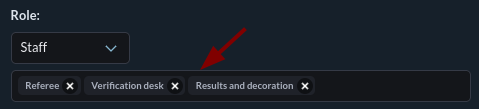
- Confirm with OK.
You can change the role or bundles later with Edit. Changes and removals take effect immediately, even if the person is already signed in.

Tech account with limited access
A shared tech account can also be limited to bundles. Open the Tech account page, select Edit, and choose Limited (bundles). Its username, password, and expiry stay the same.

What staff members see
A staff member finds the event under Manage events and opens a compact summary with links to their assigned work areas. The sidebar shows only what their bundles allow. They cannot create events, invite organizers, or see the organizer checklist and statistics.