MartialMatch is affordable and easy to use tournament software for combat sport events.
A tech account is an additional login for the person helping you run the event. This means you do not need to share your personal MartialMatch account, and they can access only that one event.
Use it for people who will run the event, for example to work with brackets, the schedule, results, or scoreboards.
Who can create a tech account?
Only a full organizer of the event can create, replace, or remove its tech account. Each event can have one active tech account.
Create a tech account
- Open your event's admin area.
- In the sidebar, select Tech account.
- Enter a username and a password. The password must contain at least 6 characters.
- Select Create tech account.
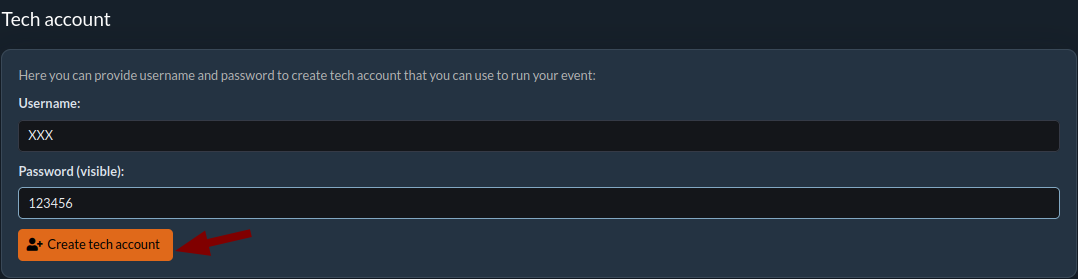
After creation, save the username and password in a secure place and share them only with the person who will operate the event.
Important: save the password immediately
The password is displayed only immediately after the account is created. After you refresh the page, it is hidden and cannot be shown again.

If you lose the password, remove the current tech account and create a new one with a new password. Removing the account also blocks its active sign-ins.
Full access or limited access
By default a tech account has full access to the event, except actions reserved for full organizers such as inviting organizers. You can switch it to Limited (bundles) and choose only the bundles the person needs, for example referee to run fights, or announcer to call competitors to the mat, without being able to change the fight order. On the Tech account page select Edit, choose the access mode, and select Save.

Switching the mode does not change the username, password, or expiry, and it takes effect immediately, even if the person is already signed in. See Staff roles and bundles for what each bundle allows.
Sign in with the tech account
The person using the tech account signs in through the regular MartialMatch login page using the tech account's username and password. After signing in, they can access only the event for which the account was created.
Remove or replace a tech account
Open the event's Tech account page and select Delete. This immediately disables the account and its active sign-ins. You can then create a replacement account when needed.
A tech account becomes inactive after the event date has passed.