MartialMatch is affordable and easy to use tournament software for combat sport events.
Verification of competitors during tournaments
During tournaments, it is essential to verify each competitor before they can compete. The MartialMatch system provides a simple verification module that allows you to confirm whether a competitor is eligible to participate. The criteria for verification are determined by the tournament organizer, typically including checks on the competitor's weight, medical documentation, or insurance.
🔍 Navigate to the verification page

Aby zacząć weryfikację zawodników, przejdź do sekcji Weryfikacja zawodników pod menu Zawodnicy w panelu organizatora. Ta sekcja jest podzielona na trzy zakładki:
In order to start verifying competitors, go to the Competitor Verification section under the Competitors menu in the organizer panel. This section is divided into three tabs:
- Fights queue - shows competitors who require verification first, meaning those who have a fight scheduled soon.
- Full list - contains all registered competitors, their statuses, and allows for verification. You can also use the search function to quickly find a specific competitor.
- History - allows you to view all previous verifications.
✅ How to confirm a competitor?
No matter which tab you are using, next to each competitor in the table there is an Edit button. Clicking it will open the following window:
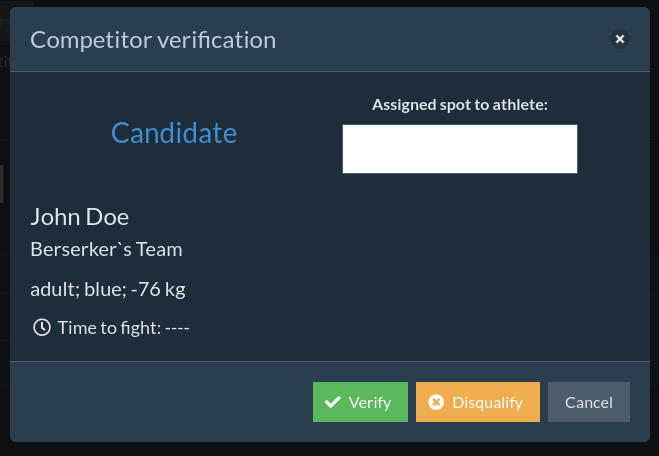
- After clicking Verify, the competitor will receive the status Verified (no color markings on fight lists).
- After clicking Disqualify, the competitor will receive the status Disqualified 🟡. This will be indicated by a yellow label on scoreboards and fight lists.
If we want to reverse our decision, we can do so at any time by returning to the competitor and clicking: Undo verification/disqualification.
Assigning a spot to a competitor (optional)
🤼♂️ Option is only available for wrestling tournaments.
If we are conducting wrestling tournaments through the system, during verification, we can additionally assign a competitor to a spot that will later be used for drawing in the bracket.
Usually, this is organized so that competitors draw a number during weigh-in. Then, in the field on the right side, we enter the drawn number (from 0 to 1000).
After confirming the entire category and proceeding to bracket drawing, the system will arrange competitors in order of their numbers.
👥 Competitor statuses
On the verification list, the statuses used by the system are reflected, marked with appropriate colors. You can read more about competitor/registration statuses here.
⏳ Blocking early verification
To prevent competitors from being verified too early, the system allows you to set a time before the competitor's scheduled fight during which they can be verified. When you click the Block early verifications button, a window will appear where you can enable/disable the option and specify the time in minutes:
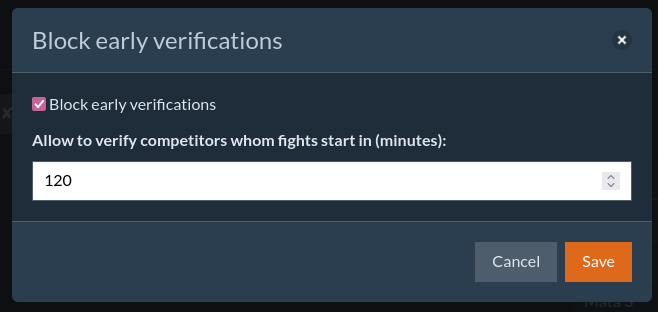
For example, entering 120 minutes means that the competitor can be verified no earlier than 2 hours before their first scheduled fight.
⚠️ Automatic disqualification of unverified competitors
The MartialMatch system also allows for the automatic disqualification of all competitors in a category that is starting. This option helps clearly define the status of competitors when fights in that category begin, saving time and avoiding calling unverified competitors to the mat.
- This option is OFF by default.
- It can only be enabled by a full tournament organizer.
The automatic disqualification is activated when the first fight in the category is displayed on the scoreboard. All competitors with the status Unverified 🔴 will transition to the status Disqualified 🟡.