MartialMatch is affordable and easy to use tournament software for combat sport events.
Invitation links let organizers accept registrations after registration for an event has closed.
You can even use them on the day of the event to let people who were not previously registered sign up - for example, for an Open category.
Each link can be used by only one MartialMatch user. Create a separate link for every person you want to invite.
🔗 For organizers
- Open the organizer panel for the event.
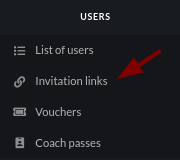
- In the Users menu, select Invitation links.
- Click Create new link.

- Choose how long the link should remain active: 30 minutes, 1 hour, 2 hours, 4 hours, or 8 hours.
- Click OK. The link will be created.

- Click Copy next to the newly created link and send it directly to the coach or competitor.
For security, use the shortest expiry time that is practical and share the link only with its intended recipient.
⚠️ Do not open the link yourself to test it. The first MartialMatch user who opens it claims the link. If you open it while signed in to your organizer account, the recipient will not be able to use it. Delete the link and create a new one for the recipient.
👥 For coaches and competitors
Before opening the link, sign in to your MartialMatch account. If you don't have one yet, create it first. Opening the link takes you to the event registration page, where you can register competitors.
The link is assigned to whoever opens it first. You can register yourself, or anyone from your My competitors list. If the link has already been used by someone else, you won't be able to open it - contact the organizer for a new one.
🗑️ For organizers: checking or revoking a link
The Invitation links page shows when each link was created, when it expires, and the user who has used it. If you no longer want a link to be available, click Delete next to it. Deleted links cannot be used, including by the person who received them.

If a recipient cannot open a link because it has expired or was deleted, create a new one and send it to them.