MartialMatch is affordable and easy to use tournament software for combat sport events.
What is the Fighting scoreboard for?
The Fighting scoreboard is designed for JJIF Ju-Jitsu Fighting System matches between two competitors: blue and red. Fighting is not a generic cumulative-points discipline - a match is fought in three technical parts, each with its own scoring, and there are several ways to win immediately. The scoreboard combines the main fight timer, the three part ledgers, penalties, the Osae-komi hold timer and the per-competitor medical time in one screen shared by the table operator's laptop and the connected audience TV.
It becomes the default scoreboard for the Jiu-Jitsu Fighting discipline package and is selectable in the discipline package settings like the other two-competitor scoreboards.
How does MartialMatch support Fighting?
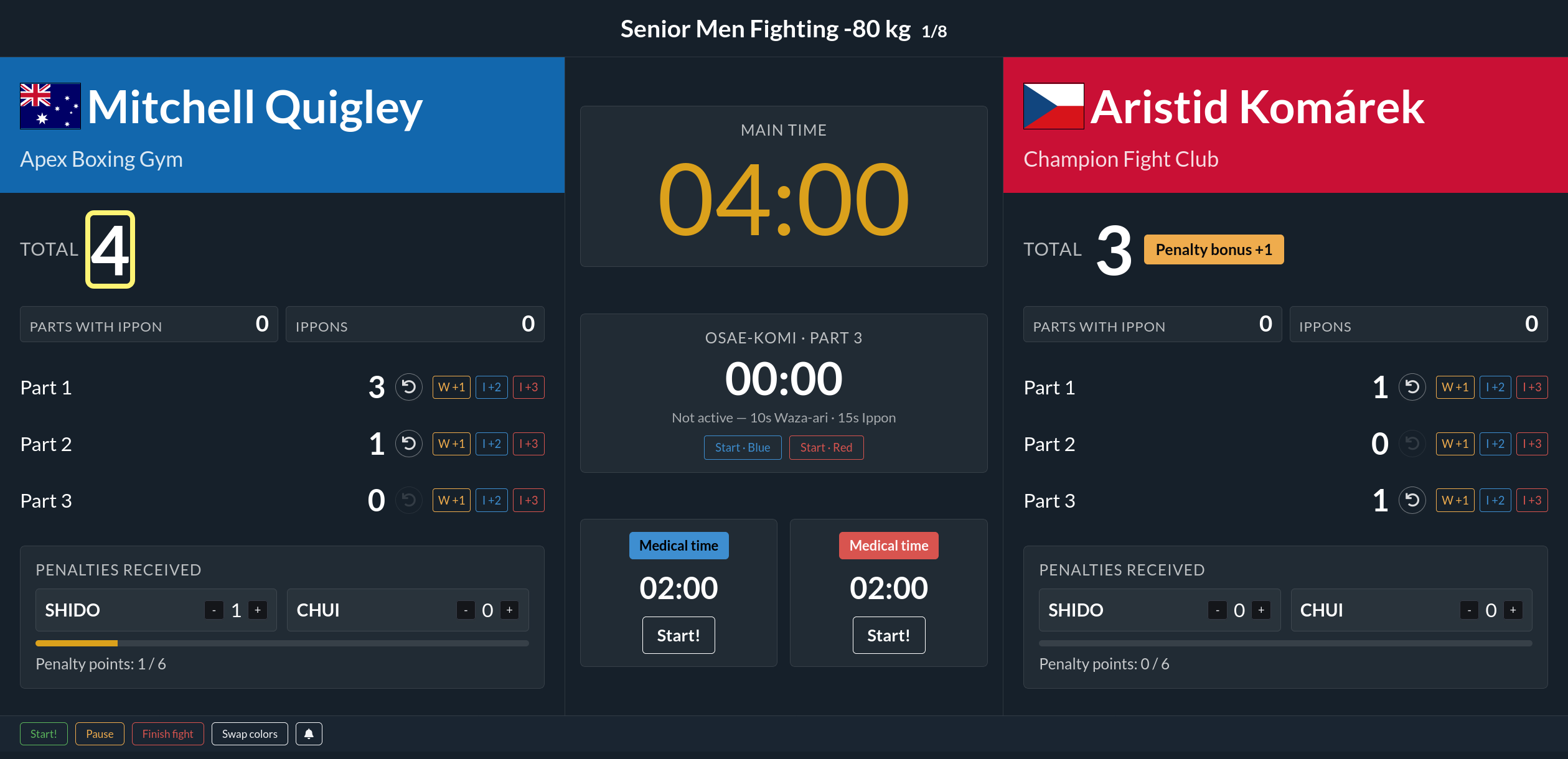
Shared blue and red scoreboard
The scoreboard shows both competitors side by side with large totals, the three part rows, the penalty section, and a center column holding the main timer, the Osae-komi panel and the two medical timers. The laptop and the connected TV show the same page - there is no separate operator-only panel. On a read-only display the same layout is shown but the controls cannot change anything.
Fight time
The main timer uses the fight duration from the event/category configuration (it is not fixed to a single value, because age and event formats vary). The full time is shown undivided - Fighting has no rounds.
Three parts
Each competitor column has three technical rows:
| Part | Covers |
|---|---|
| Part 1 - Atemi | striking |
| Part 2 - Throws / takedowns | throws, takedowns, standing locks |
| Part 3 - Ground | ground holds, locks, chokes (includes Osae-komi) |
Each part has the same three scoring buttons:
| Button | Meaning | Points |
|---|---|---|
| W +1 | Waza-ari | 1 |
| I +2 | Ippon | 2 |
| I +3 | Ippon | 3 |
Every button records the score against that exact part. Each part row shows its own subtotal, and the competitor's overall total is shown above the rows. A per-part undo button removes the most recent action in that part.
Full-ippon (50:0)
If a competitor scores at least one Ippon (2 or 3 points) in all three parts, the scoreboard pauses the main timer and highlights that a Full-ippon condition is met. It does not finish the fight automatically - the table official reviews it and confirms the result in the Finish fight modal. A confirmed Full-ippon is saved as 50:0.
Penalties - Shido and Chui
Penalties are given in the offending competitor's column and the bonus goes to the opponent:
- Shido - the opponent receives 1 Waza-ari; the offender gets 1 penalty point.
- Chui - the opponent receives 3 Waza-ari; the offender gets 3 penalty points. The Waza-ari award for a Chui is set by the event's ruleset configuration.
The penalty-origin Waza-ari is added to the opponent's total and shown as a separate bonus below the total - it is never assigned to Part 1/2/3. A progress bar shows penalty points out of 6. When a competitor reaches 6 penalty points (any mix of Shido and Chui - e.g. six Shido, two Chui, or one Chui and three Shido), the scoreboard pauses the timer and proposes Hansoku-make (50:0 to the opponent). As with Full-ippon, the table official confirms it in the Finish fight modal.
Osae-komi hold timer (Part 3)
Use the Osae-komi panel when the referee calls a hold:
- Start · Red / Start · Blue starts a 15-second count-up for that competitor. Only one hold can be active at a time.
- Toketa releases the hold.
- At 10 seconds the scoreboard awards a Part 3 Waza-ari (1 point).
- At 15 seconds it replaces that with a Part 3 Ippon (2 points) and releases the hold.
If the competitor finishes the hold with a submission, score the Part 3 Ippon directly - this stops the hold and does not double-count the hold's own points.
Medical time
Each competitor has their own independent 120-second medical countdown. Start it when treatment actually begins; pause it when treatment stops or the medical team leaves to fetch equipment. Starting a medical timer automatically pauses the main fight clock and any active Osae-komi hold.
The medical timer only measures and shows time - it never decides the outcome. When it reaches zero the scoreboard simply shows it as expired. It does not pause into a proposed result and does not assign 50:0. The official doctor has the final say on whether the competitor continues; the table operator then manually resumes the fight or finishes it (typically Kiken-gashi / 50:0 if the competitor cannot continue).
Live winner indication and tie-break tally
Below each total the scoreboard shows two read-only tiles: Parts with Ippon and Ippons. A yellow highlight on a competitor's total marks the current leader following the JJIF tie-break order: first total points, then the number of different parts with an Ippon, then the total number of Ippons.
This highlight is a live indication only, not a decision. If the competitors are still level on every step at time expiry, the match goes to an extra round. The saved result's winner is always confirmed by the table official in the Finish fight modal. The tiles are read-only and never add score.
Live display
The controller screen and the read-only display stay synchronized so a separate screen can show the score, penalties, timer, Osae-komi and medical time to athletes, coaches and spectators while the operator controls the fight.
Finishing the fight
Click Finish fight when the referee has decided the result. The Fighting modal offers:
- Full-ippon - Ippon in all three parts (50:0).
- Hansoku-make - disqualification by penalties or a severe foul (50:0 to the opponent).
- Points - normal time-expiry decision by accumulated score and the tie-break order.
- Other options:
- Fusen-gashi (walkover) - opponent did not show up (50:0).
- Kiken-gashi - opponent withdrew, including injury-caused withdrawal (50:0).
- Disqualification - opponent was disqualified administratively or by the table, e.g. failed verification or missed weigh-in (50:0).
The saved Fighting result stores the winner, the finish type, the fight time, the per-part scores, the penalty (Shido / Chui) counts and the computed totals for both competitors. After the result is saved, event administrators can review it in the event panel.