MartialMatch is affordable and easy to use tournament software for combat sport events.
Every event now has a Coach passes page that tells you, for that event specifically, who is allowed to hold a coach or manager credential for each academy registered - without you having to track it manually.
What is a coach pass?
A coach pass identifies the Manager(s) and Coach(es) of an academy at your event, so you know who to trust with a coach/manager credential at check-in - the person who can be at ringside/matside for that academy's competitors.
The list is scoped to your event only: it's built from academies that actually have a competitor registered at this specific event, not from an academy's overall roster or its wider affiliation/parent-academy network. An academy's parent or sister academy doesn't automatically get a coach pass just because a related academy registered - only the exact academy each competitor is registered under counts.
Where to find it
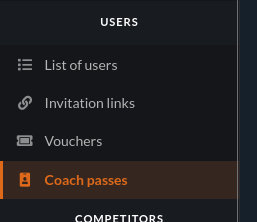
Open your event's admin area, then look under the Users section in the sidebar for Coach passes.
How the list is built
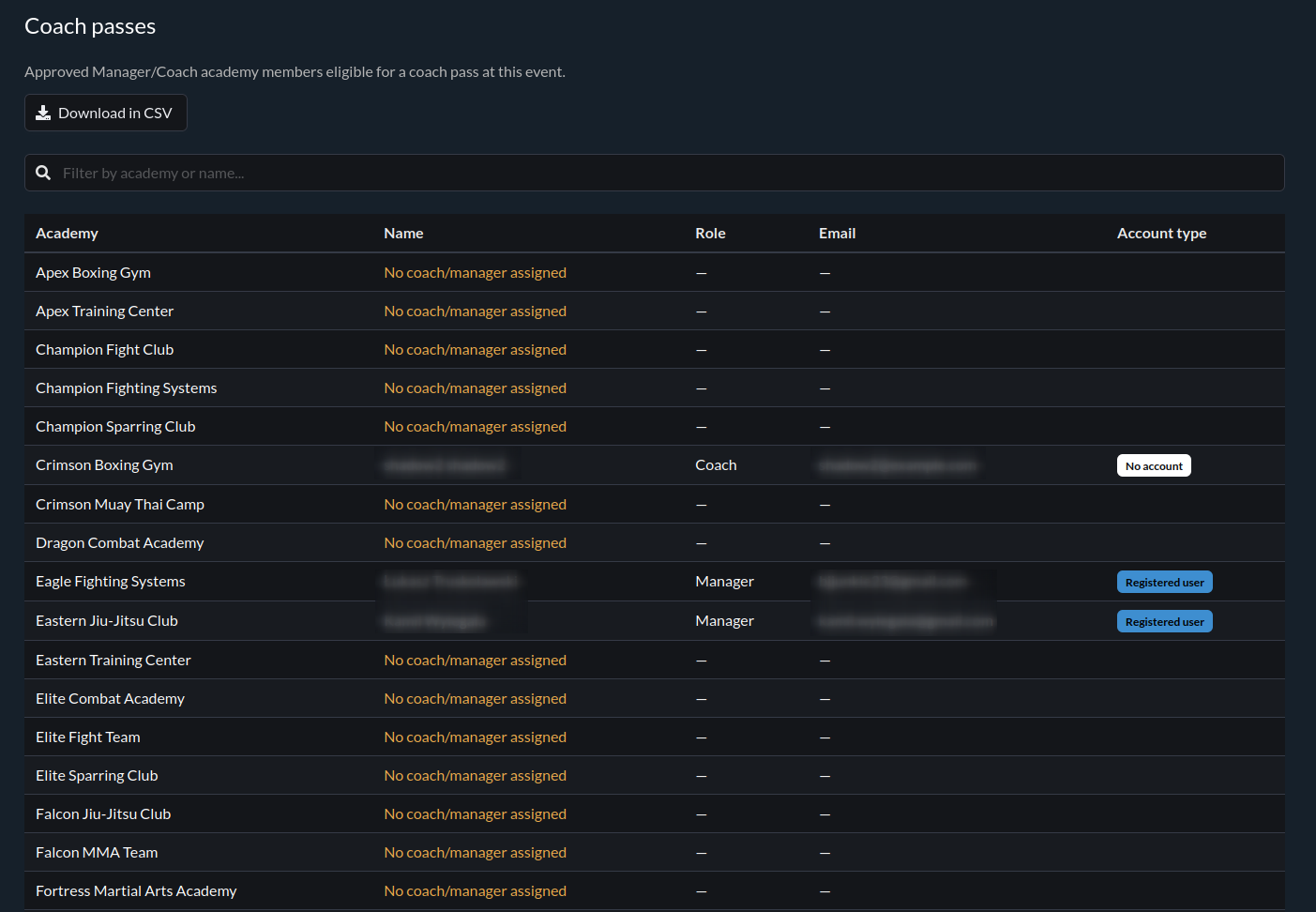
The Coach passes page lists, for every academy with at least one registered competitor at your event:
- every member of that academy who currently holds the Manager or Coach role,
- and who has been approved by that academy's own management (see the note below).
Each row shows the academy, the person's name, their role, their email, and an account type tag - Registered user if they're a registered MartialMatch user, or No account if they were added by their academy as someone without an account - either way, they're a valid coach-pass holder.
Academies with nobody assigned
If a registered academy has no Approved Manager or Coach at all, it still shows up on the list - as a row flagged "No coach/manager assigned" instead of a person's name. This is meant to be actionable: it tells you which academies you should follow up with before the event, rather than silently leaving them off the list.
A note on "Pending" members
An academy's Manager can turn on Manual approval for their membership requests (see the companion article for academy Managers). When they do, a person who requested to join is held as Pending until approved. A Pending member never appears on this list, no matter what role they were assigned - only members the academy has actually approved count toward a coach pass. If someone you expect to see is missing, the most common reason is that their academy hasn't approved their membership yet.
Exporting the list
Use the Download as CSV button on the Coach passes page to download the same list as a CSV file
- useful for printing your own pass list, sharing it with check-in staff, or importing it into whatever system you already use to produce physical credentials.
The CSV contains the same columns as the on-screen table, including academies with no coach or manager assigned, so it can double as a follow-up checklist as well as a credential list.
Printing the passes as a PDF
Use the Download as PDF button next to the CSV button to get print-ready passes. The PDF is A4 portrait with four A6 passes per page (105 × 148 mm, a common badge-holder size) and cut guides between them. Each pass shows your event's image, name and date, the "Coach" label, the person's name and their academy.
Academies with nobody assigned get a blank pass. The academy name is already printed and the name line is left empty, so you can write the name by hand if a coach shows up unannounced.
The PDF always contains the passes of all academies, even if you have typed something into the filter on the page. The button is hidden while the list is empty.
The PDF is generated in the language you are currently using in MartialMatch.
Limiting the number of passes per academy
Above the table you can set a limit, for example 1 coach pass per 10 competitors. The limit is counted per academy, by the number of different competitors it has registered (a competitor entered in several categories counts once), and rounded up per started block: with 1 per 10, an academy with 1 to 10 competitors gets 1 pass, 11 to 20 gets 2, and so on.
- If an academy has more coaches or managers than its limit allows, the ones who joined the academy first keep their passes. The others stay in the table, greyed out and marked Not included, and are left out of the CSV and the PDF.
- Fill unused passes with blank ones adds blank passes up to each academy's limit, which is handy while few coaches are registered.
- Blank names only prints only blank passes (the academy's limit, or one per academy without a limit) and ignores registered coaches, so names can be written by hand.
The table, the CSV and the PDF always follow the same settings, so what you see is what you print. The settings are remembered for each event in your browser only; in another browser there is no limit until you set it again, and the line under the settings always shows the rule currently in use.